Automation
Automation runs a short C# script against the open activity. Use it for changes that no task covers and that would take too long by hand in Data.
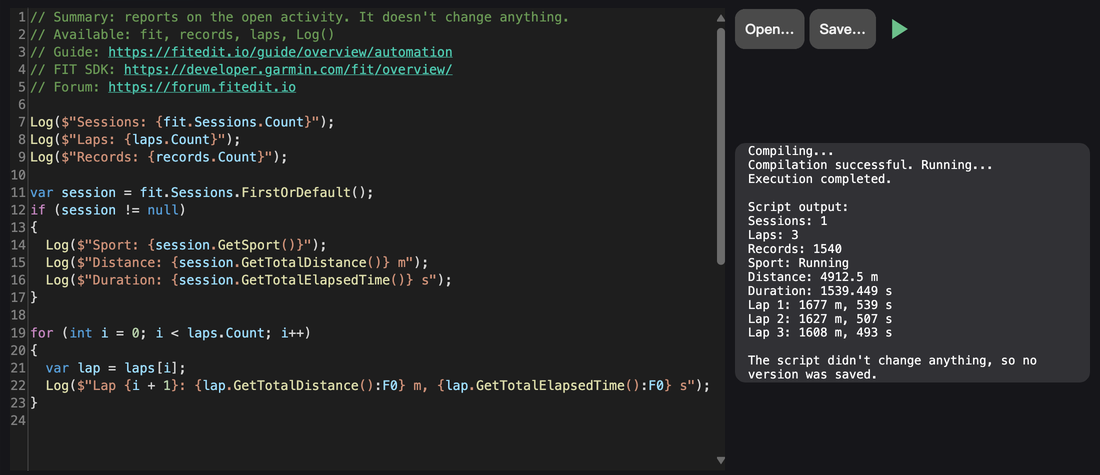
The script can use these names.
fitis the whole file.recordsis the list of Record messages.lapsis the list of Lap messages.Log()prints to the box on the right.
The script can also call anything in the Garmin FIT SDK, Garmin’s software library for reading and writing FIT files. Each record is a RecordMesg and each lap is a LapMesg, with a getter and setter for every field, such as GetHeartRate() and SetEnhancedSpeed(). See the FIT protocol to learn about the FIT file format.
The sample script prints a summary of the activity and each lap’s distance and time. It does not change anything. Change it to suit what you need, then click the green play button.
Click Save… to keep a script in a file, and Open… to load it again.
Example
This script removes every heart rate reading over 200. A chest strap can read that high before it warms up.
int removed = 0;
foreach (var record in records)
{
  if (record.GetHeartRate() > 200)
  {
    record.SetHeartRate(null);
    removed++;
  }
}
Log($"Removed {removed} heart rate readings");
If the script changes the activity, FitEdit saves it as a new version. Undo goes back.
Automation requires a license.